.gif)



Tips & Trends
-
April 23, 2026
How to Do the AI Yearbook Trend on TikTok (A Simple Guide)
written by
The AI Yearbook Trend is one of TikTok’s biggest nostalgia-driven movements, turning ordinary selfies into 90s-style high-school portraits. It works by using the EPIK app to generate your “yearbook photos,” then combining them into a short video using TikTok or CapCut. The result is a quick, polished, and highly shareable clip that fits perfectly into TikTok’s visual style.
This guide shows you exactly how to do the trend, why it’s so popular, and the steps to create the viral-style montage you’ve seen across TikTok and Instagram Reels. If you're exploring the wider rise of AI visuals, you'll also find helpful context in our breakdown of the broader AI Trend and the Instagram AI Trend.
What Is the AI Yearbook Trend?
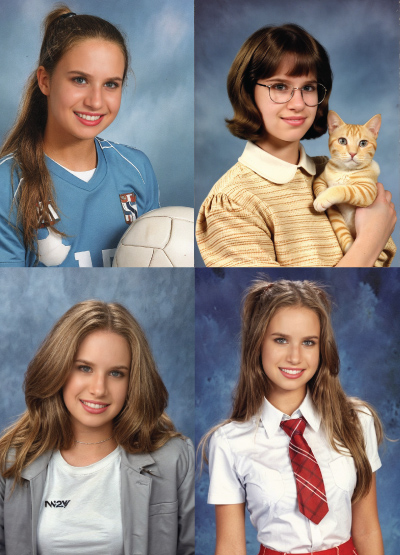
The AI Yearbook Trend is a viral TikTok format where users transform their selfies into 90s-style high-school portraits using the EPIK AI Photo Editor. The app generates a full set of retro yearbook photos — usually around 60 images — which you can then compile into a short TikTok or Instagram Reel.
In short, it’s a mix of nostalgia, AI creativity, and classic TikTok editing. People love it because the results look surprisingly realistic, and the style taps into the timeless “American high school yearbook” aesthetic that performs well on visual platforms.
Why it’s so popular
- It blends nostalgia with current AI tools.
- The results look polished and hyper-real.
- It's easy to recreate — no editing skills needed.
- TikTok sounds and CapCut templates make it simple to follow the trend.
If you want to understand how this fits into bigger AI movements, you can also explore how the AI Trend is evolving across platforms or see how Instagram’s AI Trend compares for creators and brands.
How to Do the AI Yearbook Trend on TikTok (Step-by-Step)
Here’s the simplest way to recreate the AI Yearbook Trend from start to finish. The process has two stages: generating the photos inside the EPIK app, then turning them into a short TikTok or CapCut montage.
Step 1 — Generate Your AI Yearbook Photos Using the EPIK App
The EPIK app is where all the 90s-style portraits are created. This part takes the longest, but you only need to do it once.
How to generate your photos
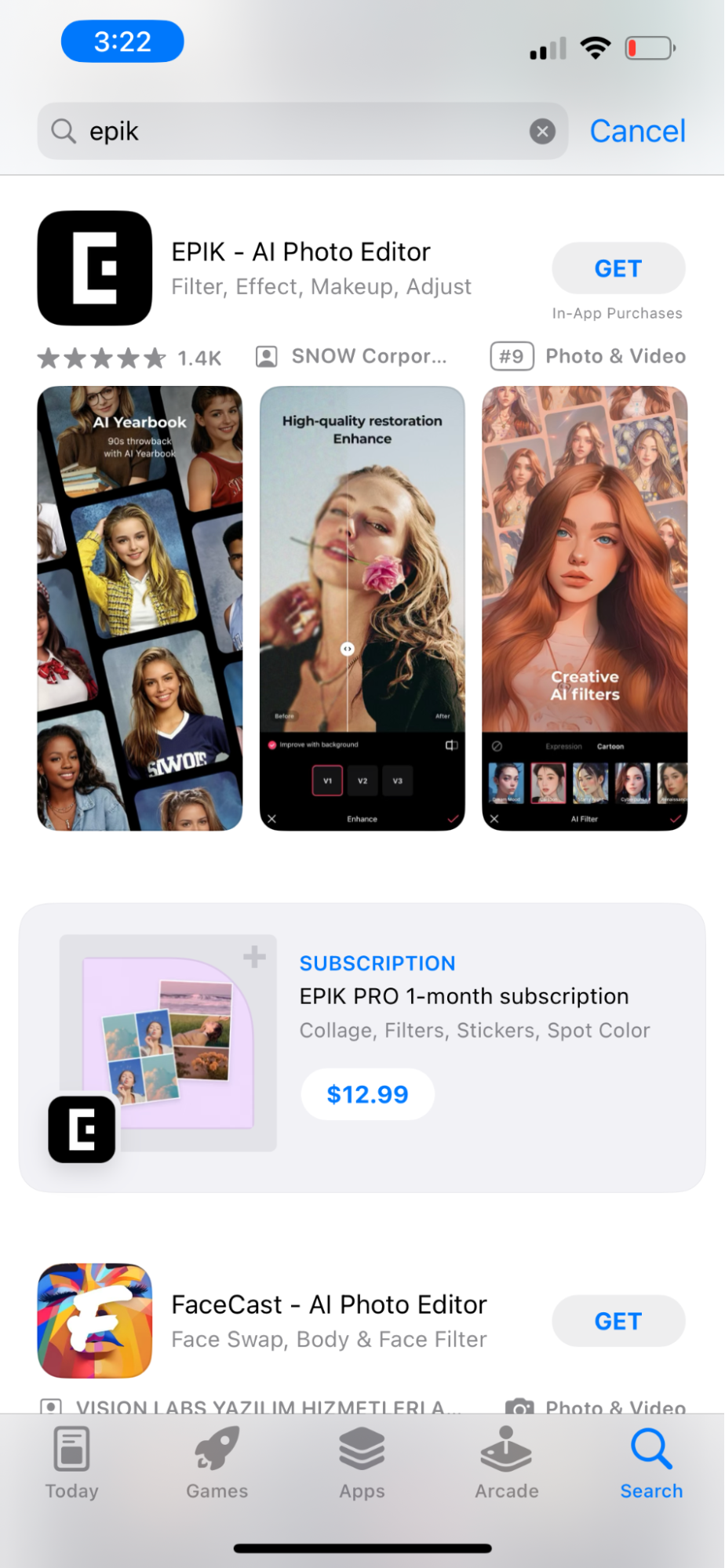
- Download EPIK – AI Photo Editor
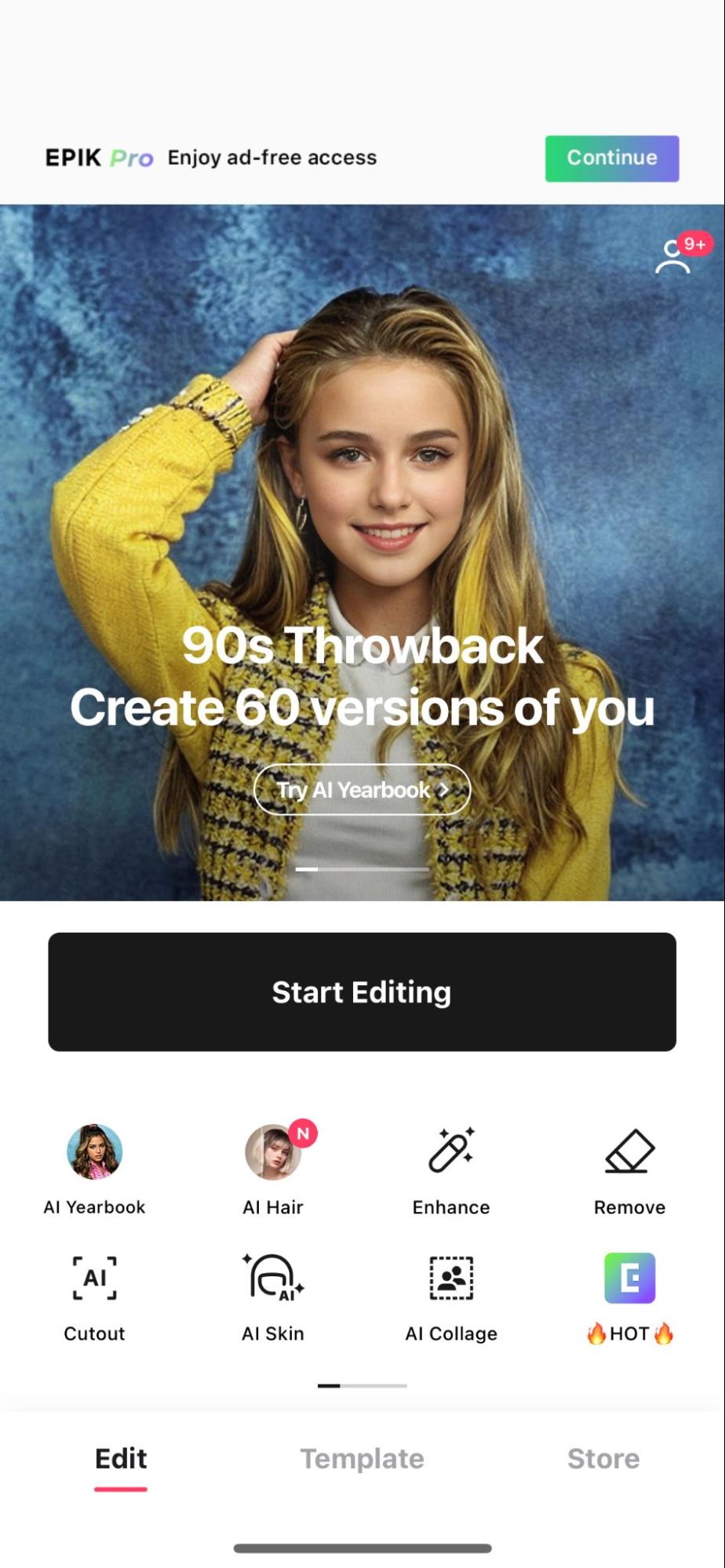
Available on the App Store (iOS) and Google Play (Android). - Open the “AI Yearbook” feature
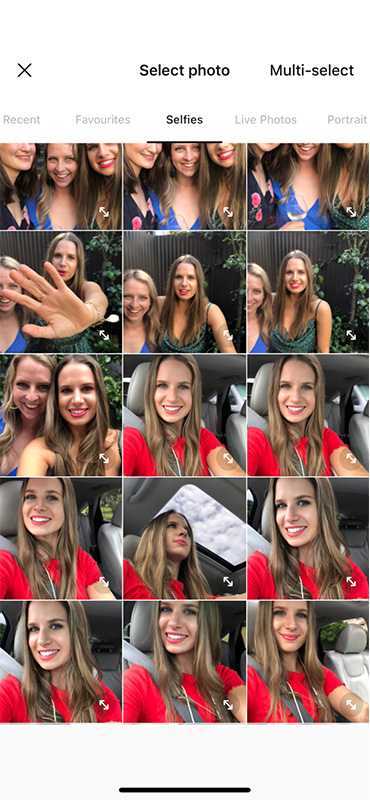
It usually appears on the home screen or under AI tools. - Upload 8–12 clear selfies
Good lighting and simple backgrounds work best.
Avoid: hats, sunglasses, heavy filters, group photos, or full-body shots. - Select your gender
This helps the AI choose accurate hairstyles and yearbook styles. - Choose your delivery speed
- Express: usually around 2 hours
- Standard: up to 24 hours
- Wait for your 60 AI-generated portraits
You’ll get a full set of classic 90s high-school looks — sports portraits, yearbook headshots, candid-style photos and more. - Save the images to your device
You can save them individually or download everything at once.
If you’re noticing smoother results on Instagram’s version of the trend, that’s because Instagram leans into stylised portraits rather than the full “yearbook” look. We break this down further in our blog on the Instagram AI Trend.

Step 2: Turn Your Photos Into a TikTok Video
Most people use CapCut to recreate the exact timing and structure of the trend. TikTok recognises these templates, so it’s the fastest way to make your video look on-trend.
How to do it
- Open TikTok and find a video using the AI Yearbook sound.
- Tap “CapCut – Try this template” when TikTok prompts you.
- CapCut will open automatically with the template loaded.
- Select the AI portraits you saved from EPIK.
- Preview the montage — it should sync to the trend sound automatically.
- Export the final video with “Add sound in TikTok.”
This moves the video back into TikTok already matched to the trending audio, ready to post. If you regularly create social video content, you might also find it helpful to explore our roundup of AI tools for social media management, which includes simple ways to automate editing and scheduling.
For brands using TikTok professionally, our TikTok Agency page breaks down exactly how we approach viral-style content for clients.
Step 3: Post It Using the Trend Sound
Once TikTok loads the video back in:
- Add a short caption (e.g., “AI Yearbook Trend
- Use relevant hashtags like #yearbooktrend or #AIyearbook
- Keep your cover frame clean — portraits perform best
- Post during peak times for your audience
If you’re also active on Reels, check out our comparison of TikTok vs Instagram Reels to choose the best channel for reach.
Tips for Better AI Yearbook Photos
The AI Yearbook Trend works best when the selfies you upload give the AI enough detail to recreate your face clearly. Small changes in lighting or angles can dramatically improve the final portraits.
What to do for the best results
- Use bright, natural lighting
The AI performs best when your features are fully visible. Stand near a window or face a light source. - Choose simple backgrounds
Busy or patterned backgrounds can confuse the model. - Capture a mix of angles
Use a blend of front-facing selfies and slight side angles. This helps the AI build a more accurate 90s-style set. - Keep your face unobstructed
Avoid hats, sunglasses, masks, or hair covering your face.
Remove heavy filters
AI tools struggle with smoothed skin, warped proportions, or over-saturated filters.
What to avoid
- Group photos
- Blurry images
- Distant full-body shots
- Harsh shadows or backlighting
Following these basics usually leads to sharper, more realistic results — the kind that tend to perform better on TikTok and Instagram Reels.
If you're testing out other AI styles, our guide to the Instagram AI Trend shows how creators get high-quality portrait results using slightly different tools.
Why the AI Yearbook Trend Keeps Going Viral
The AI Yearbook Trend blends nostalgia, personalisation, and simple editing — three ingredients that consistently drive viral behaviour on TikTok. It delivers fast, impressive results without requiring editing skills, making it easy for anyone to join in.
The main reasons it took off
- Nostalgia always performs well
The 90s high-school aesthetic taps into a shared cultural memory that feels instantly recognisable, even for users outside the US. - AI visuals look polished with minimal effort
EPIK’s portrait tool produces realistic results that stand out in a feed full of filters and templates. - It fits TikTok’s “show your transformation” format
Trends that reveal a before/after moment — like AI portraits, avatars, or transformations — naturally encourage replays and shares. - Templates keep the trend consistent
CapCut’s one-tap templates make the format simple to copy, keeping the trend alive for longer. - It links into a bigger wave of AI content
From AI avatars to surreal Instagram portraits, creators are exploring how AI can enhance storytelling and personal branding. We break down this wider movement in our guide to the AI Trend across social platforms.
Together, these factors help explain why the yearbook format has held attention longer than most TikTok trends — and why brands are starting to use similar AI visuals in campaigns.
Is the AI Yearbook Trend Free?
The short answer: not usually.
The AI Yearbook Trend itself isn’t free because the EPIK app charges a small fee to generate the portraits. The cost covers the processing time needed to create the full set of 90s-style images.
What you can expect to pay
- Express delivery: Higher cost, usually delivered in around 2 hours
- Standard delivery: Lower cost, delivered within 24 hours
TikTok and CapCut are free to use, so the only paid part is the photo generation inside EPIK.
Are there free alternatives?
There are free AI photo tools online, but they rarely recreate the classic yearbook style or produce the same level of accuracy. Most free tools struggle with lighting consistency, hairstyles, or realistic 90s details — which is why creators typically stick with EPIK for this trend.
If you're exploring other AI-led formats that don’t require paid tools, have a look at how creators are using the Instagram AI Trend to generate portrait edits directly through mobile apps.
How Long Does the AI Yearbook Trend Take?
The time it takes to do the AI Yearbook Trend depends on the delivery option you choose inside the EPIK app.
Quick answer
- Express: Around 2 hours
- Standard: Up to 24 hours
Once you have the portraits, the TikTok or CapCut montage usually takes 2–5 minutes to put together.
Why it varies
AI models process each selfie individually before generating the final 60-image set. Express delivery gets pushed to the front of the queue, while standard delivery waits for available processing time.
If you're creating multiple AI-style videos in a batch (for a campaign, client, or brand content), this is where tools like the ones in our guide to AI tools for social media management can help streamline the editing and posting process.
How to Make Your AI Yearbook Video Stand Out
Once you’ve generated your portraits, the difference between an average post and a strong-performing one often comes down to the edit. TikTok is driven by sound timing, quick storytelling, and visuals that hold attention in the first two seconds.
Use the right sound
Trends on TikTok move fast, so choose the audio that most current creators are using for the AI Yearbook format. TikTok usually suggests it automatically when you upload your video.
Keep your edit clean
- Use a short, tight montage—you don’t need all 60 images.
- Prioritise the portraits with the strongest lighting and clearest expressions.
- Avoid fast, choppy transitions; the trend looks better with smooth, simple pacing.
Add simple text overlays
Short labels like “Class of ’95 vibes” or “My AI Yearbook” work well. They give users context instantly, especially for viewers who watch without sound.
Use CapCut templates wisely
CapCut's templates remove most of the editing work, but feel free to adjust timing or remove any frames that feel repetitive. A polished montage often performs better than an exact template copy.
Post at smart times
Upload when your audience is most active. If you're unsure, your TikTok analytics (available on Pro accounts) will show peak hours and days.
If you’re building a full TikTok strategy — whether for a brand or your own content — our deep dive on AI tools for social media management can help you streamline the editing, scheduling, and testing process.
FAQs
How do you do the AI Yearbook Trend fast?
The quickest method is choosing Express delivery inside the EPIK app. This usually delivers your portraits in about two hours. Once they’re ready, using a CapCut template lets you create the TikTok montage in just a few minutes.
Do you need CapCut to join the trend?
No — you can upload the portraits directly to TikTok and edit manually. CapCut simply makes the process easier, especially if you want to match the timing and flow of the viral version you’re seeing on your For You Page.
Why isn’t the AI Yearbook feature showing in my EPIK app?
It may temporarily disappear during high demand. Make sure your app is updated, try refreshing the homepage, or check again later. EPIK often rotates trending features based on server load.
Can you do the AI Yearbook Trend for free?
EPIK’s Yearbook feature is paid, but TikTok and CapCut are free. While there are free AI portrait tools, they typically don’t replicate the detailed 90s yearbook style as accurately.
Does the AI Yearbook Trend work on Instagram too?
Yes — you can post the portraits on Instagram Reels or Stories. Some creators adapt the montage for Reels using a slightly slower pace. For a deeper look at how AI visuals perform on Instagram, explore our guide to the Instagram AI Trend.
How to do the AI yearbook trend for free?
To craft your initial AI yearbook image, visit the App Store or PlayStore and acquire the Reface app. Once installed: Launch the Reface app and navigate to the primary style selection screen. There, choose the 90s Yearbook style pack. Click on the "Add New Photos" button located at the screen's bottom.
How to do the 90s yearbook trend?
Step 1: Retrieve the EPIK photo app from the app store. While the app itself is free, creating your AI 90s high school yearbook photos comes with a cost.
Step 2: Select 'Try Now' for the AI Yearbook.
Step 3: Upload your selfie collection.
Step 4: Complete the payment process.
Step 5: Generate your 90s yearbook-style images.
How to get the AI '90s yearbook photos all over your FYP (for you page)
To get the ‘90s AI yearbook photos that are all over your FYP, simply download the EPIK photo app from the app store and select ‘AI Yearbook’ and follow the prompts. You will be asked to upload selfies that will be turned into 90s high school yearbook photos that you can share on TikTok and Instagram.
Curious about the differences between TikTok and IG Reels? Explore our detailed comparison blog to navigate the nuances of these popular short-form video platforms. Uncover the strengths and unique features that each offers for your content strategy.
Ready to Level Up Your TikTok Strategy?
Turn trends into real business results with our expert TikTok management services. We create scroll-stopping content, build strategies that actually work, and help brands grow through data-led creativity.If you want to tap into viral formats like the AI Yearbook Trend — or simply elevate your entire TikTok presence — our team can handle everything from strategy to production and performance tracking.Connect with us today and discover how TikTok can become a real growth engine for your brand.
This blog post was created with the help of an AI tool, which speeds up Born Social’s publishing process. A digital marketing specialist has reviewed this content before it was published. You may report any errors to info@bornsocial.co.
about the author
Janelle Warner is our creative marketer who thrives on strategic thinking and exploring industry best practices. She's a master of thinking outside the box to deliver impactful campaigns. Janelle, with her master's degree in advertising, adds a wealth of knowledge and innovation to our projects.

Social Media Management Pricing in Australia (2026 Guide)

How to Choose a Social Media Agency in Melbourne
Have a



%201.png)
%202.png)
